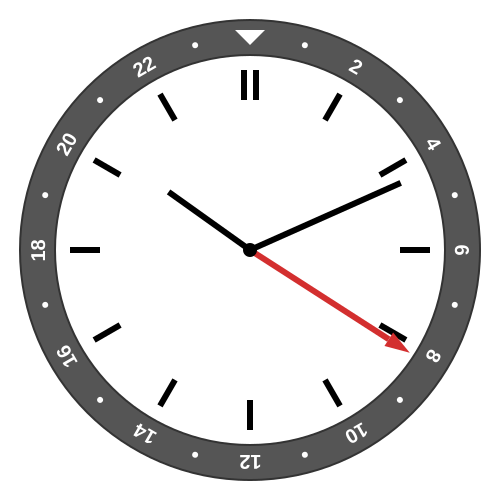
It is 10:11 a.m. in Central European Summer Time, and the GMT hand is showing 08:11 UTC.
I got a new watch.
I’ve almost exclusively worn an Apple Watch for the past several years. I still wear one when exercising and sleeping, and I plan to still wear it on some other occasions, but I wanted to see what it was like to go back, shall we say, to a simpler time.
My initial feelings are a happy dose of nostalgia. Back before all of our phones and watches and cars were synchronized to NIST time, I would carefully synchronize my Timex digital watch to the school bell time. It was satisfying to know exactly how much time was left in class (or passing period) while most of my classmates just had to wait and wonder when freedom would come (or end).
With a “dumb” watch, there is this same sense of satisfaction, that I know the precise time not through the wonders of the internet, but because I made the effort to accurately set my watch.
My new watch is a GMT watch, which is a popular watch style over the last century or so, because it makes it easy to know the time in a second or even third location, and can make it easier to change the time as well.
There are many different styles of GMT watch, but they are usually distinguished by a separate “GMT hand” that makes one revolution per 24 hours, compared to a traditional hour hand that revolves once per 12 hours. A GMT watch typically has the traditional hour hand as well, which most people call the “local hour hand,” because it tracks the time of your current location. Both of these hands are typically aligned to the same minute hand.
Being non-smart watches, they are relatively simple to configure. A true GMT or flyer GMT lets you adjust the time (minutes and hours) on all three hands simultaneously, and then jump the local hour hand forward or backwards an hour at a time. On a caller GMT or office GMT, the jump function moves the GMT hand forward or backwards an hour at a time. Either way, you can track both the local time and a separate reference time, but the caller GMT is more cumbersome to travel with, because if you change time zones, you have to reset the watch the same way you would any watch, and then also fix the GMT hand to point back to whatever reference time you want to track. A flyer GMT lets you quickly adjust the local time without messing up the GMT hand at all.
Many GMT watches also feature a rotating bezel labeled on a 24-hour scale. This gives you a way to quickly change the meaning of the GMT hand by shifting the labels instead of the hand. Hence you have the ability to track a potentially third time zone. I say potentially because on most GMT watches with a bezel, the bezel is the only set of 24-hour labels, so if you rotate it, you might not know exactly where the GMT hand is pointing on the “natural” set of labels.
Here are some examples of tracking two or three time zones on a GMT watch:
It is 10:11 a.m. in Central European Summer Time, and the GMT hand is showing 08:11 UTC.
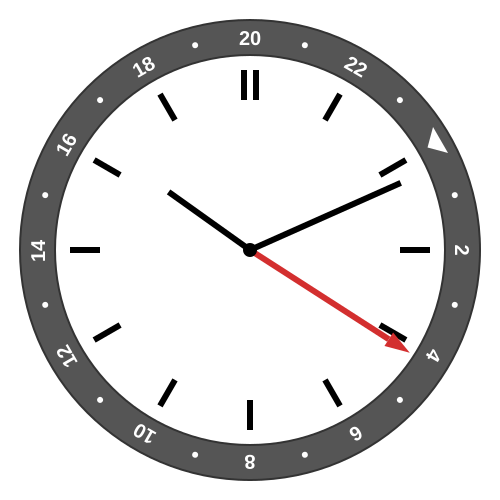
By rotating the dial four 15-degree clicks, we can read the New York Daylight Saving Time (UTC−4) as 04:11.
In these examples, note that the twelve o’clock position represents midnight UTC, and in the second example, the 20 (which is −4 modulo 24) lines up with this slot so that we can read UTC−4. And even with the bezel rotated, you get a sense of the UTC time because you will at least remember where 0, 6, 12, and 18 would be on the unrotated bezel.
Although a GMT watch only has a few configurable parts (minutes, local hour, GMT hour, and bezel rotation), you get to choose what the configuration should be. If you really wanted to, you could have the “local time” always be your home time and the “GMT hand” be your current local time.
I knew I wanted to use the local hour hand the normal way, with the local time of wherever I happen to be (usually in Los Angeles). At first, I thought that I would use the GMT hand for UTC, and then rotate the bezel to whatever second time zone I was actually interested in. But I was quickly annoyed that the direction of the GMT hand didn’t really have any meaning to me.
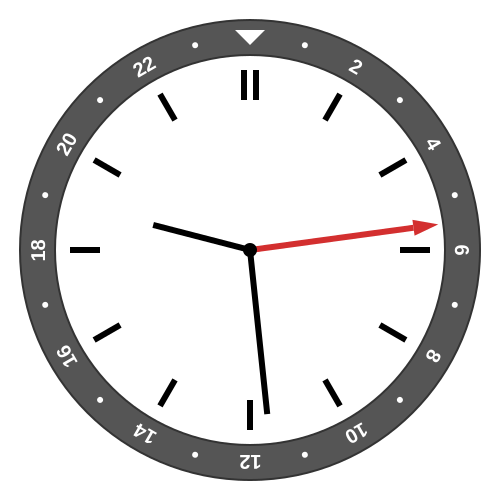
At 9:29 p.m. Los Angeles winter time, it is 05:29 UTC
Next, I decided to use my home time (or at least UTC−8, more on that in a bit) for the GMT hand. This way, no matter where I am in the world, the GMT hand in the upper half means it is night in Los Angeles, and in the lower half means it is daytime.
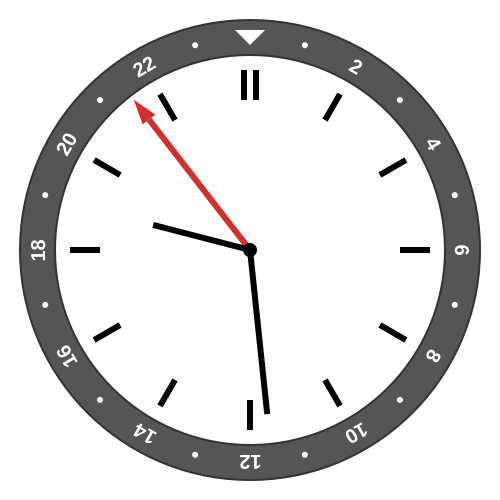
Still 9:29 p.m. in Los Angeles, with the local 24-hour time of 21:29 shown on the GMT hand
Then I realized that, because my watch doesn’t have a fixed set of labels, I could orient the “natural” 24-hour scale with midnight at the bottom and noon at the top, imitating the path of the sun. I decided to keep the bezel oriented with the zero marker at 6:00, so that I can read the Los Angeles 24-hour time off the bezel, if I want.
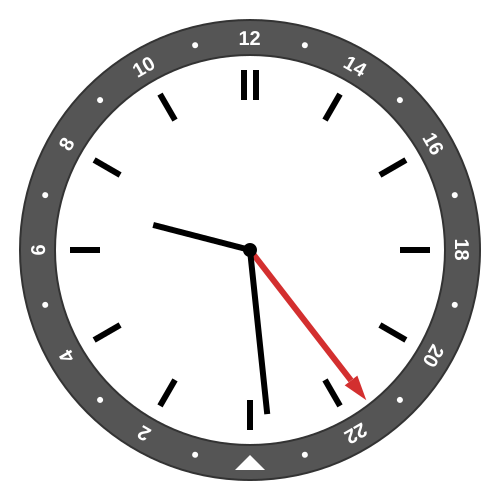
Again 9:29 p.m. in Los Angeles, with the local 24-hour time of 21:29 shown and the bezel rotated so that noon is at the top and midnight at the bottom.
Then when traveling, I can intuitively read my home time off the GMT hand.
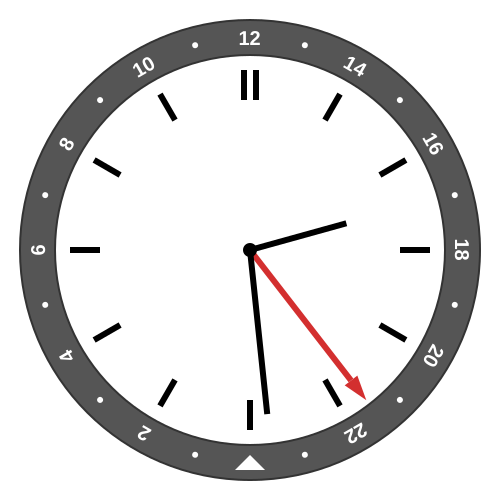
Jumping the local time to 2:29 p.m. (Tokyo time), the GMT hand and bezel still pointing to Los Angeles time of 21:29.
And in this configuration, midnight UTC happens when the GMT is at the two o’clock position, which means I can easily spin the bezel to read a third time zone, for example, putting the 1 at two o’clock to read UTC+1.
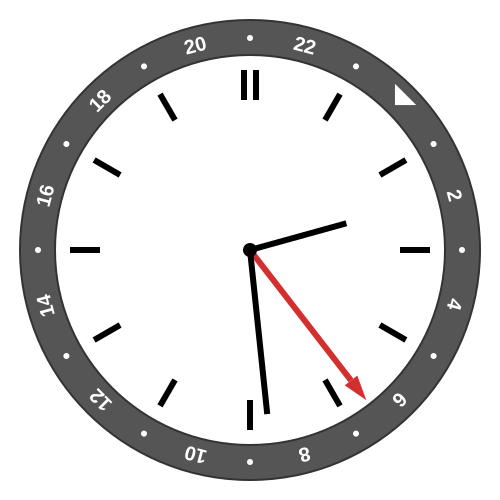
Still 2:29 p.m. in Tokyo, and 06:29 in UTC+1. Evening in Los Angeles.
Here is where things get a little speculative because I’ve only had the watch for a month, and haven’t had to transition to summer time. So I have plans but maybe I will change my mind after some experience.
The Los Angeles time zone is only UTC−8 on winter time. For the rest of the year, we observe Daylight Saving Time, which puts us at UTC−7.
There are a lot of reasons to leave the GMT hand at (noon-on-top) UTC−8. First of all, it makes adjusting for Daylight Saving Time a simple jump of the local hour hand. It also preserves the two o’clock UTC reference point year round, making a third time zone a bit easier. It is also somewhat convenient because I can still track (approximate) astronomical noon and midnight.
But it also means that during the summer, if I want the 24-hour bezel to track Los Angeles 24-hour time by default, then it has to be one 15-degree rotation askew.
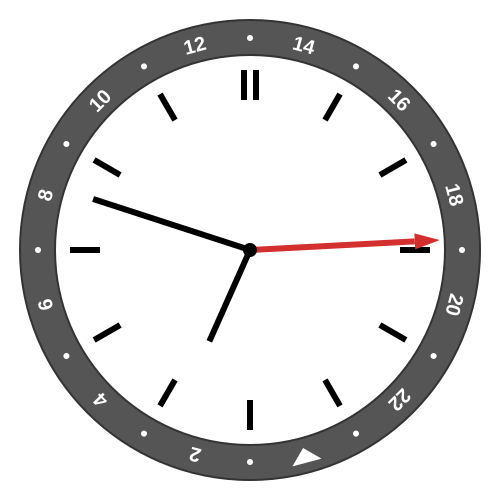
Local Los Angeles summer time of 6:48 p.m., the bezel rotated to show UTC−7 time of almost 19:00, but the GMT hand also shows the natural solar time of almost 18:00.
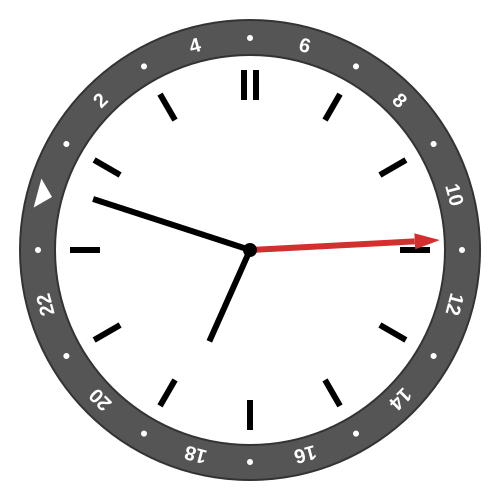
Quick spin of the bezel, aligning the 9 with the two o’clock marker, to check UTC+9 Tokyo time, where it is nearly 11 a.m.
Many years ago, I tried to use the Apple Watch GMT Face and didn’t last long. I looked at it again to remind myself why I don’t like it.
First of all, you have no choice about any orientations. The local hand has to match your local time (but at least it automatically adjusts when you travel). And of course, up has to be midnight because the programmers might die if they had to add that level of complexity.
The GMT hand also has to match your local time as well. As I mentioned, I don’t like how this messes with my intuition in the admittedly rare case when I’m in a different time zone.
You track a second time zone with a software spin of the bezel. Making use of the flexibility of a digital screen, the bezel is two-toned with the colors representing night and day, based on the current sunrise and sunset in the second time zone. Analog GMT watches often have two-toned bezels, with transitions fixed at 6 and 18. (You could argue that 6 a.m. and 6 p.m. are more useful markers than sunrise and sunset in a time zone where you aren’t currently located.)
Unfortunately, the Apple Watch bezel isn’t actually labeled except for the index closest to the hand, because otherwise the digital face gets too cluttered. Even worse, if you have your watch set to show 12-hour time, the index gets labeled with the 12-hour time, with no indication of a.m. vs p.m. except for the color of the bezel.
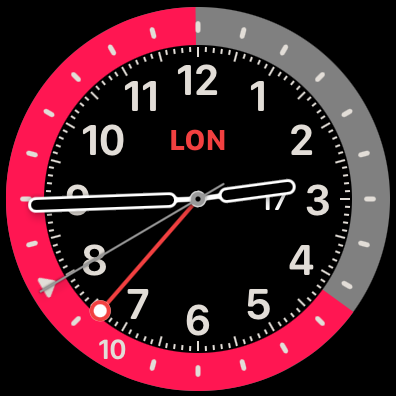
Apple Watch showing 2:44 p.m. in Los Angeles, 10:44 p.m. in London. You infer that pink is night because it is so long, or from the triangle that still marks midnight. Note that the GMT hand tracks Los Angeles time (currently UTC−8), but with midnight on top, so UTC midnight is at the eight o’clock marker.
Finally, and this is an ongoing gripe I have against Apple, by default the time zone label in the middle of the face says CUP for Cupertino (just like in iPhone Settings). If that annoys you, you can change it to SF for San Francisco. Neither of those is the correct name of the time zone. Twenty years ago it was cute to label the Pacific time zone as Cupertino in honor of your headquarters. It’s not cute anymore.